


Power Formulas: Use ChatGPT & AI in Google Sheets Review: The Verdict – Worth It or Not?
If you’re a content creator, eCommerce entrepreneur, or marketer, you know that data management and content creation can often feel like a juggling act. Traditional tools may help you with one aspect of your work, but wouldn’t it be amazing if you could integrate AI-powered tools directly into your Google Sheets workflow? That’s exactly what Power Formulas delivers—a powerful Google Sheets add-on that seamlessly integrates cutting-edge AI models like GPT-4, Claude, Google AI, and Cohere into your spreadsheet tasks.
By combining AI-generated content, bulk image creation, and advanced data analysis features, Power Formulas transforms how you interact with Google Sheets. Whether you need to generate SEO-optimized articles, create unique visual content, or automate tedious tasks, Power Formulas makes it all possible without leaving your spreadsheet.

In this review, I’ll explore how Power Formulas works, how it can boost your productivity, and whether it's worth the investment for your business.
What is Power Formulas?
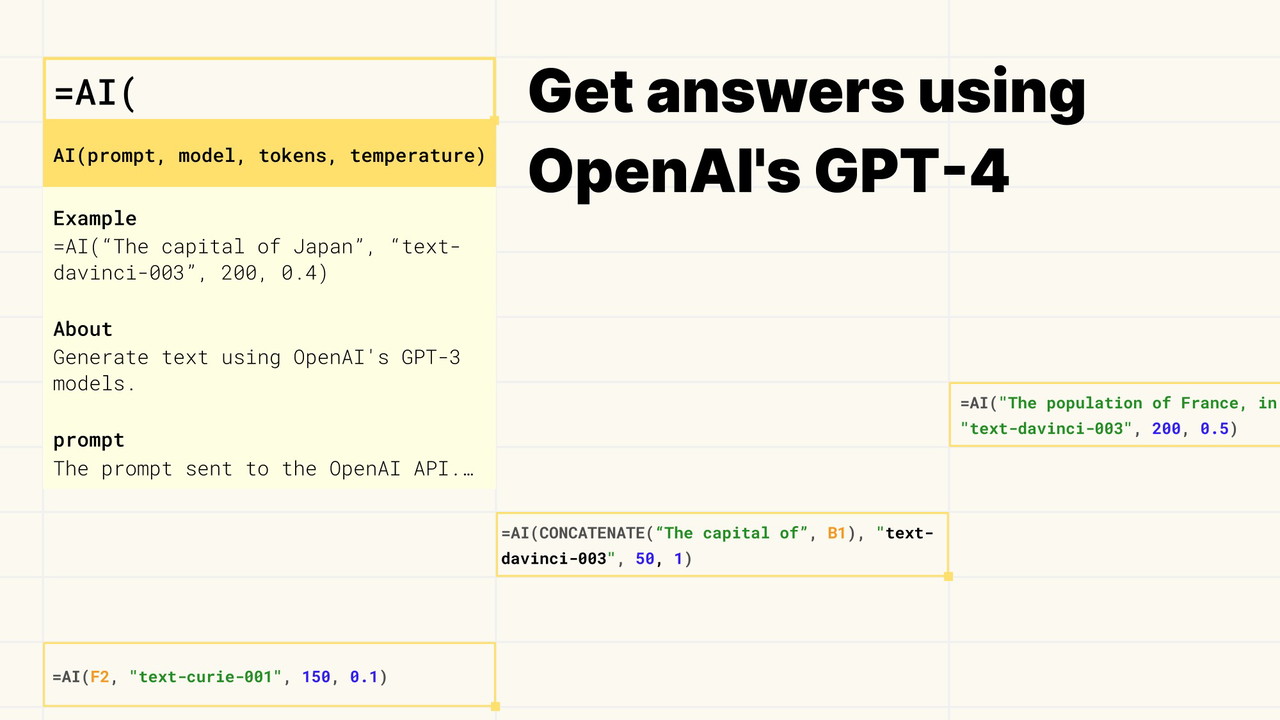
Power Formulas is a powerful Google Sheets add-on that connects your spreadsheet with top-tier AI models, including OpenAI's GPT-4, Anthropic's Claude, Google Gemini AI, and Cohere. Using simple formulas like =AI() and =AI_IMAGE(), you can generate text, content, and images directly within your sheets, without the need for separate AI tools or platforms.
This integration allows you to tap into AI's full potential while maintaining the convenience of working within Google Sheets. It’s a productivity tool that connects everything you need in one place, making it easier for you to execute tasks faster and with greater accuracy.
Key Features of Power Formulas
1. AI-Generated Content with =AI() Formula
One of the standout features of Power Formulas is the =AI() formula. This powerful tool lets you generate AI-based content right inside your Google Sheets. By connecting your spreadsheet to advanced AI models, like GPT-4 and Claude, you can automatically generate articles, blog posts, product descriptions, or any other type of written content.
-
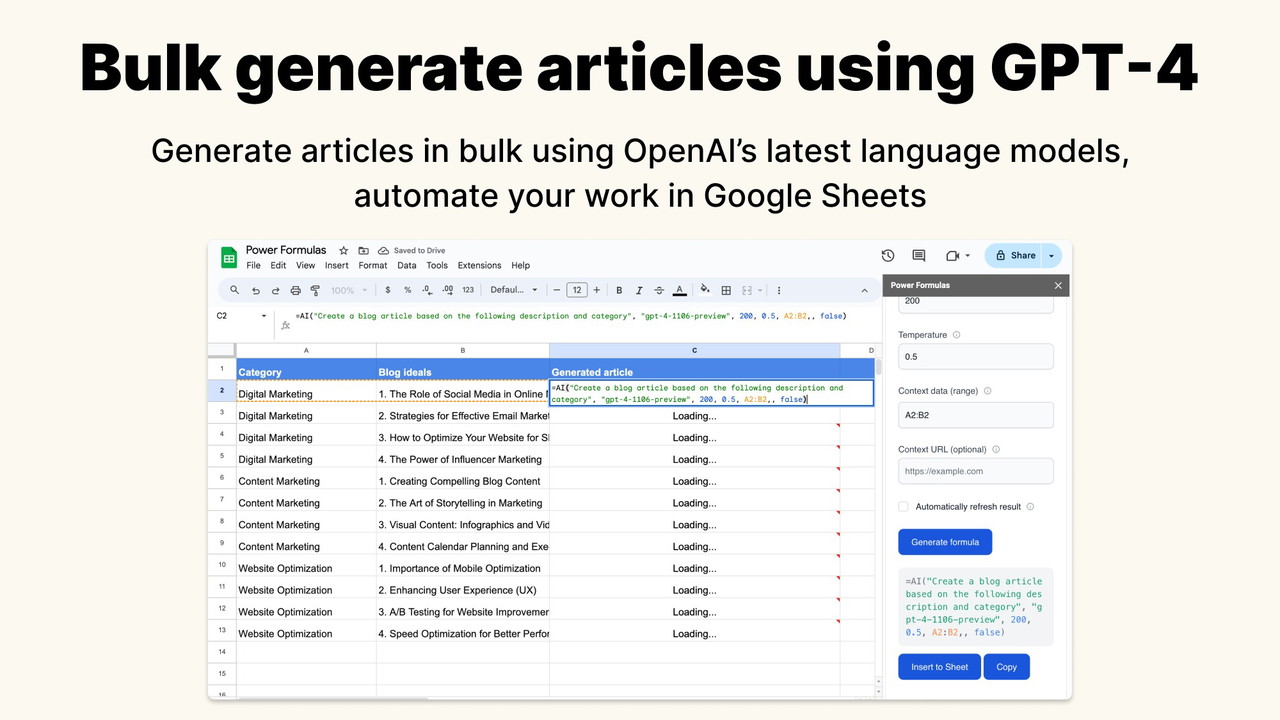
Content Generation: Simply enter a prompt into your spreadsheet, and the formula will use AI to generate high-quality content based on the information in the cells. It’s ideal for content creators who need bulk content or ecommerce businesses looking to write product descriptions in large volumes.
-
SEO Optimization: The articles generated using the =AI() formula are designed to be SEO-friendly, making it easier for you to scale your content marketing strategy and drive organic traffic.
-
Web Scraping: Another exciting feature is the ability to scrape content from websites. This functionality allows you to pull in relevant content from any webpage and have it form the basis of your AI-generated article, creating richer and more comprehensive content.
Sponsored
2. AI-Generated Images with =AI_IMAGE() Formula
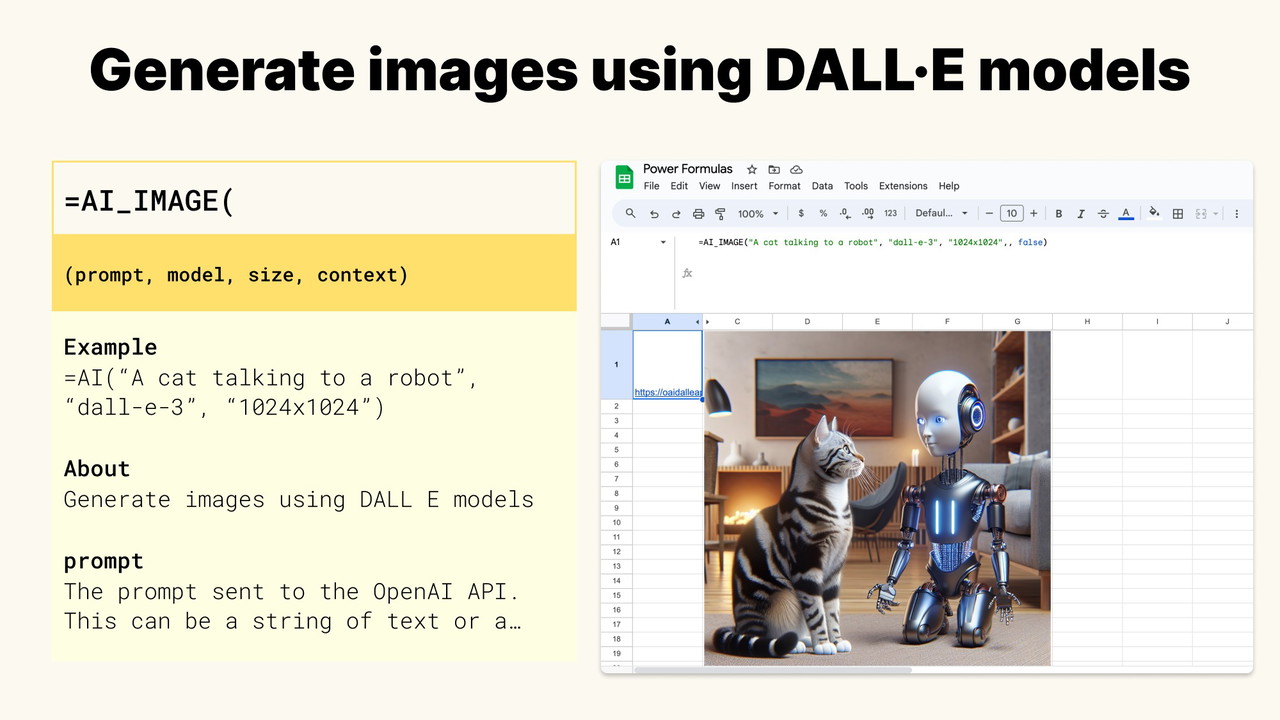
For marketers and content creators, visuals are just as important as written content. With the =AI_IMAGE() formula, Power Formulas simplifies image generation by allowing you to generate high-quality AI images directly within your Google Sheets.
-
Quick and Easy: With just a simple command, you can generate bulk AI images for your content marketing campaigns, social media posts, or website. No need for graphic design tools—this formula handles it all for you.
-
Customizable: You can create custom visuals based on text prompts, whether you need abstract designs or more realistic images. This opens up endless possibilities for creating visuals that align with your brand's message.
3. Formula Builder: No-Code, User-Friendly Tool
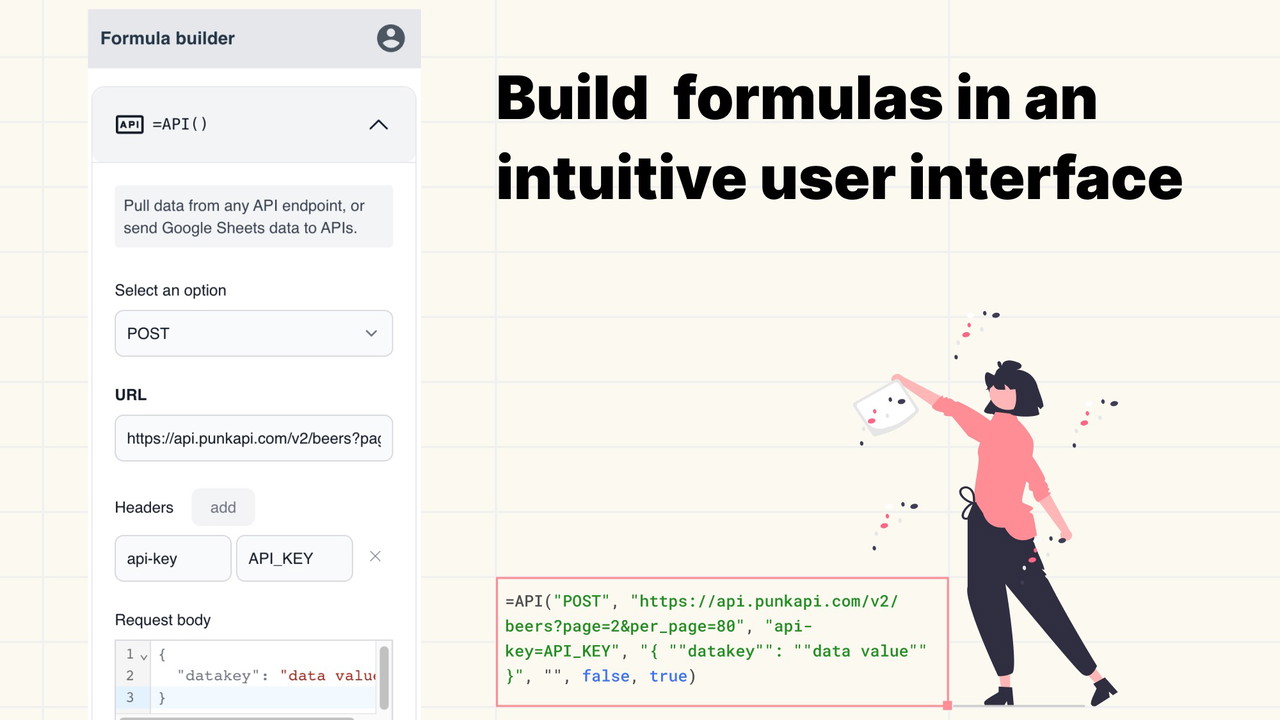
One of the challenges with using advanced formulas in Google Sheets is the complexity involved in setting them up. Power Formulas addresses this by offering a Formula Builder that makes it easy for anyone—no coding knowledge required—to construct powerful formulas.
-
Ease of Use: The Formula Builder provides a user-friendly interface where you simply select the formula you want to use, input the necessary arguments, and the tool generates the correct formula for you to copy and paste into your sheet.
-
Organized Input Fields: The input fields in the Formula Builder are arranged in a logical order, making it easy to understand what each parameter represents and ensuring that you can quickly set up your formulas without making mistakes.
4. Integrations with APIs and SQL Databases
Power Formulas also allows you to integrate data from external sources, making it a great tool for businesses that rely on data-driven insights.
-
API Integrations: You can connect your Google Sheets to external APIs, enabling real-time data pulls, making your spreadsheets smarter and more connected. This is especially helpful for ecommerce businesses and marketers who need up-to-date market data.
Sponsored
-
SQL Database Integration: If your business uses an SQL database, Power Formulas allows you to integrate it into your workflow, enabling you to analyze large datasets and perform complex calculations directly in Google Sheets.
Who Can Benefit from Power Formulas?
Power Formulas is perfect for a wide range of professionals who need to streamline their workflows and maximize productivity. Here’s how different user groups can benefit:
-
Content Creators: If you need to produce large volumes of content quickly, the =AI() formula is a game-changer. It allows you to generate articles, blog posts, and social media updates at scale without sacrificing quality.
Sponsored
-
eCommerce: Product descriptions, SEO content, and customer support responses are essential in eCommerce. Power Formulas can automate the creation of these elements, saving time and ensuring consistency across your website.
-
Marketers: With the ability to generate bulk content and visuals, marketers can streamline their content creation processes. The integration of SEO and image generation makes it easier to craft engaging campaigns without needing multiple tools.
Is Power Formulas Worth It?
If you're looking to boost your productivity and integrate AI-powered features into your Google Sheets, Power Formulas is definitely worth considering. It brings the power of advanced AI models like GPT-4, Claude, and Google AI directly to your spreadsheet, eliminating the need to switch between multiple platforms. With features like bulk content generation, image creation, and seamless API integrations, Power Formulas is an excellent tool for anyone looking to make the most of their Google Sheets experience.
However, it's important to note that while Power Formulas is powerful, you will need to obtain API keys from the respective AI providers to use the tool effectively. But with the ability to connect to multiple models and generate high-quality content and visuals, this is a small tradeoff for a highly efficient, AI-powered tool that can save you hours of work.
Final Thoughts
Power Formulas transforms your Google Sheets into a powerhouse of productivity, seamlessly integrating AI features for both content generation and visual creation. Whether you’re a content creator, marketer, or ecommerce entrepreneur, Power Formulas brings the best of AI right to your fingertips, helping you work smarter, not harder. If you’re ready to elevate your spreadsheet workflow and take full advantage of AI technology, give Power Formulas a try today—it’s a game-changer.







