


Pigeon Mail Review: The Best Tool for Sending Mass Emails in Gmail
Manually sending emails one by one is a productivity nightmare. It’s tedious, time-consuming, and nearly impossible to scale. If you’re an ecommerce business, a marketer, or a marketing agency, you need a bulk email solution that simplifies your workflow. Enter Pigeon Mail—an email automation tool that lets you send mass emails directly from Gmail with built-in tracking, personalization, and scheduling.
Unlike traditional email marketing platforms like Mailchimp or MailerLite, Pigeon Mail operates natively within Gmail, making it incredibly easy to use. You can personalize emails, track opens and clicks, and automate your outreach—without switching to a separate platform. In this review, I’ll cover everything you need to know about Pigeon Mail, from its features to how it compares to competitors. If you’re looking for a way to scale your email outreach while keeping messages personal and effective, read on!

What is Pigeon Mail?
Pigeon Mail is a Gmail extension designed to help businesses and marketers send mass emails without losing the personal touch. It integrates seamlessly with Google Sheets, allowing you to upload contact lists and send personalized emails at scale.
Key Features:
-
Bulk Email Sending: Send emails to multiple recipients without the risk of getting flagged as spam.
-
Personalization: Use dynamic fields to insert names, company details, or custom messages for each recipient.
-
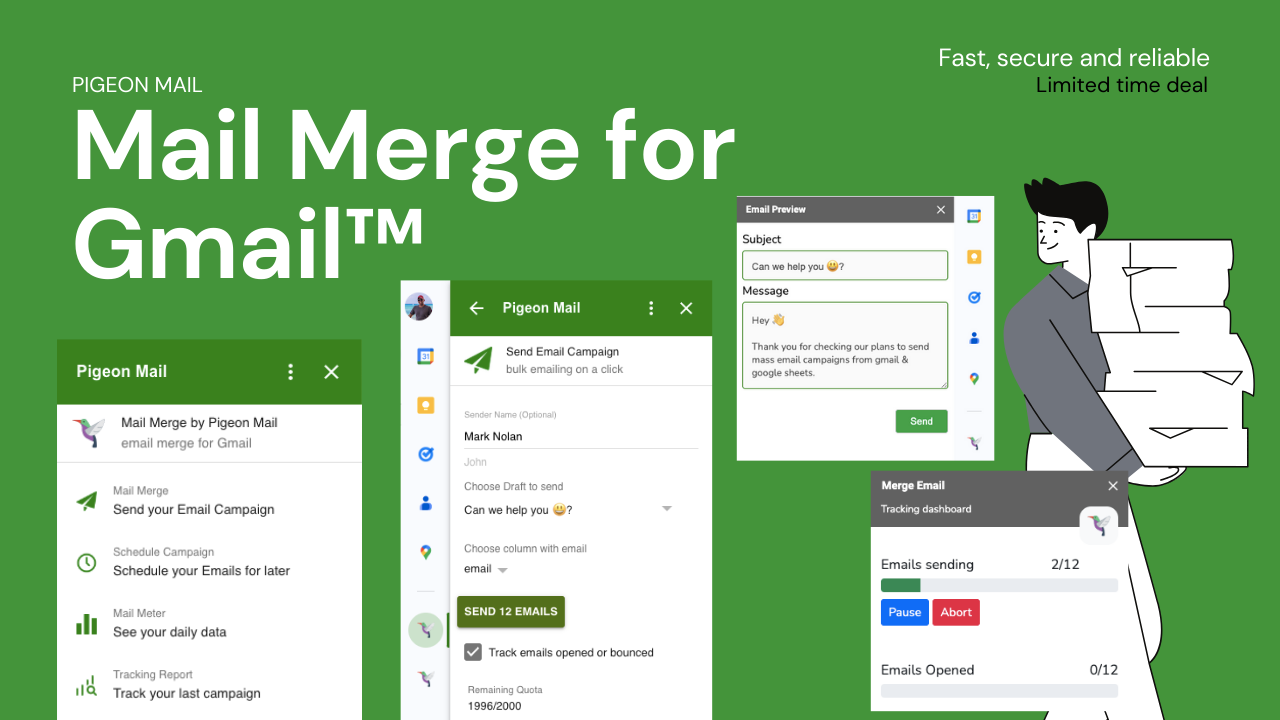
Email Tracking: Monitor open rates, click-through rates, and engagement metrics in real time.
Sponsored
-
Scheduling: Plan your email campaigns in advance and automate the sending process.
-
Attachment Support: Easily attach files, images, or PDFs directly from Gmail.
-
Compliance Features: Includes unsubscribe links to ensure compliance with email marketing laws.

How Pigeon Mail Works
Using Pigeon Mail is incredibly simple and requires no coding or technical expertise. Here’s a step-by-step guide to getting started:
Install the Extension
Pigeon Mail is a Chrome extension that integrates directly with Gmail. Once installed, you’ll see new options in your Gmail Compose window.
Upload Your Email List
Using Google Sheets, you can create a list of recipients and import it directly into Pigeon Mail. Each contact can have custom fields for personalization.
Compose Your Email
Draft your email within Gmail as you normally would. Use placeholders to personalize content automatically.
Schedule or Send Immediately
Decide whether you want to send emails instantly or schedule them for later. Pigeon Mail ensures your messages go out at the perfect time for maximum engagement.
Track and Optimize
Monitor your campaign’s performance using Pigeon Mail’s real-time tracking. See who opened your emails, clicked on links, and engaged with your content.
Why Choose Pigeon Mail Over Other Email Marketing Tools?
There are many email marketing tools available, but Pigeon Mail stands out for a few key reasons:
Works Directly in Gmail
Unlike Mailchimp or MailerLite, which require a separate platform, Pigeon Mail operates entirely within Gmail. This means there’s no need to learn new software.
No Learning Curve
If you already use Gmail, you’ll find Pigeon Mail’s interface familiar and easy to navigate.
Personalization Without the Hassle
Most email marketing tools require complex templates for personalization. With Pigeon Mail, you can add personal touches directly in Gmail.
Affordable and Scalable
Pigeon Mail offers a cost-effective solution for businesses of all sizes. Whether you’re a freelancer or a large company, you can scale your email outreach effortlessly.
Who Should Use Pigeon Mail?
Pigeon Mail is perfect for:
-
Ecommerce Businesses: Send promotional emails, abandoned cart reminders, and product updates.
-
Marketers & Marketing Agencies: Run outreach campaigns, nurture leads, and track engagement.
-
Freelancers & Consultants: Reach out to potential clients with personalized pitches.
-
HR & Recruiters: Send bulk job offers, interview reminders, and follow-ups.
Sponsored
If your work involves sending large volumes of personalized emails, Pigeon Mail will save you hours of manual work while boosting your email effectiveness.
Common Questions About Pigeon Mail
Will Pigeon Mail get my emails marked as spam?
No, Pigeon Mail follows Gmail’s sending limits and best practices to ensure deliverability. Plus, it includes unsubscribe links to keep your emails compliant.
How many emails can I send per day?
Gmail’s daily sending limit for standard accounts is around 500 emails, while Google Workspace users can send up to 2,000 emails per day. Pigeon Mail ensures you stay within these limits.
Can I track email performance?
Yes! Pigeon Mail provides real-time tracking, so you can see open rates, click-through rates, and recipient engagement.
Is Pigeon Mail secure?
Absolutely. Pigeon Mail operates within Gmail’s security framework and does not store or share your data.
Does it work with Google Sheets?
Yes, you can integrate Pigeon Mail with Google Sheets to manage your contact lists and personalize emails at scale.
Final Verdict: Is Pigeon Mail Worth It?
If you need a simple, efficient, and powerful email outreach tool, Pigeon Mail is a fantastic choice. It eliminates the hassle of manual email sending, keeps your messages personalized, and provides the analytics needed to optimize your campaigns. Best of all, it works directly inside Gmail, making it one of the most user-friendly email marketing tools available.
Stop wasting time on manual email campaigns. Try Pigeon Mail today and start reaching more people in less time!







