


Monitor wall mounts are the most space-efficient mounts. They allow you to free up desk space and keep cables organized.
Additionally, they allow monitors to be positioned at the correct height, reducing the risk of neck and back injuries . Positioning your monitor at the proper height and angle reduces eye strain by improving the screen position and reducing the distance between your eyes and the monitor.

Eye strain is very common since we spend so many hours a day in front of a computer, phone, or TV screen. That's why, with a monitor wall mount, you can adjust the distance and angle to suit your needs.
It's important to consider which mount you need and which best suits your needs. These wall mounts require drilling into the wall.
You should also keep in mind that some mounts are fixed and others are tilting, or have extendable arms, so you should consider their features to make the best choice.
In any case, all monitor stands help you maintain proper posture while you work, and avoid neck and back pain.
We present a selection of the best wall mounts for installing your monitor or screen.
Duronic DM65W1X2 Monitor Arm for 15 to 27" Wall Mount
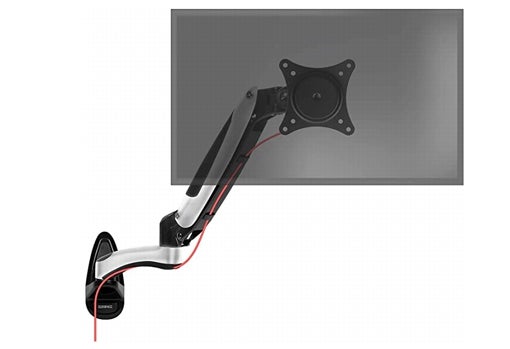
The DM65W1X2 is a gas-spring wall mount for a PC monitor or TV. With this mount, you can adjust your screens to the viewing angle you need. This is possible thanks to the adjustable arm and head, which also reduce the space occupied by the device bases and keep your desk clear, optimizing the organization of your office or bedroom.
The Duronic DM65W1X2 mount allows you to adjust the tilt angle of your computer or TV monitor and improve your viewing angle. This mount is suitable for displays weighing up to 8 kg and measuring between 15 and 27 inches (38–68 cm).
This mount offers a -90°/+85° tilt angle, 360° screen rotation, and 180° left-to-right swivel. It is suitable for displays and televisions compatible with VESA 100x100 and VESA 75x75 mounting standards ( the vertical and horizontal distance between the screws on the back of the display must be 10 cm or 7.5 cm).
This Duronic DMW1 monitor arm is a high-end monitor arm with a carefully designed aluminum construction. The gas spring system provides great flexibility when moving the monitor.
Installing the display is easy thanks to the VESA 75/100 mount (the universal standard for all PC monitors). Simply mount it on a wall and you can adjust the display to the desired distance using the 57cm arm.
The screens can be positioned either horizontally or vertically, which is very practical for those who like to read the newspaper on their PC. This type of screen arm supports a maximum load of 8 kg per monitor.
StarTech.com ARMWALL Wall Mount
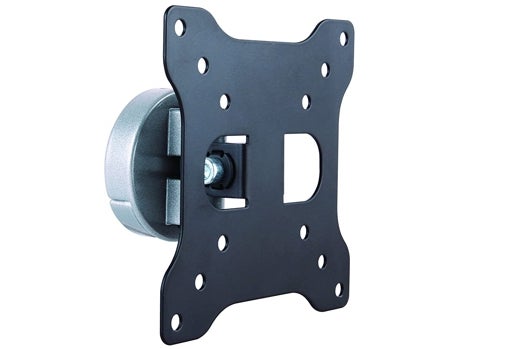
This monitor wall arm extends a full 195mm, making it easy to reposition your screen so you can work more comfortably or share screen space with others.
This adjustable single- swivel stand reaches +90° / -90°, allowing you to easily move your screen left or right for maximum viewing flexibility. It fully tilts +45° / -45° , allowing you to easily adjust the viewing angle up or down to share your screen content and collaborate with team members.
This monitor wall mount arm accommodates flat panel displays up to 27" in size and extends 195mm , allowing for versatile display adjustment.
StarTech.com ARMWALL saves space on your desk or tabletop by allowing you to wall-mount a computer monitor or LED/LCD TV display measuring 13" to 27" (330 to 686 mm) and weighing up to 15 kg.
This wall mount features a sliding plate design for easy installation. To keep your work area clutter-free, this monitor arm also includes a clip that keeps cables neatly organized and out of sight.
TecTake Wall Mount
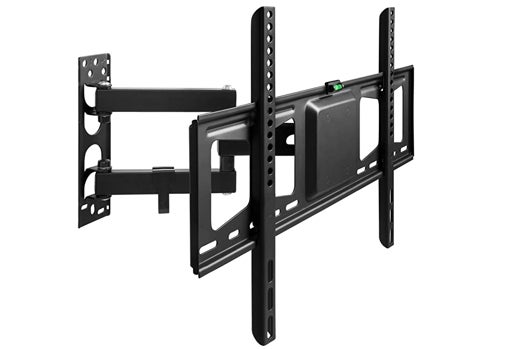
This TeckTake wall mount is adaptable, tiltable, and rotatable. It can be easily and effortlessly adjusted to the desired angle and distance from the wall. Distance from wall: 55 to 356 mm. Swivel angle: 180°. Orientation: -2° to 12°.
It is flexible and suitable for many TV models. 32 to 60 inches. VESA 200 x 100 to 600 x 400. Load capacity: 60kg.
Installation is quick and easy. Wall plate (width x height): 66 x 224 mm.
With this TecTake wall mount, you can enjoy the best TV experience at home, from any angle.
The TecTake wall mount eliminates glare and flickering on your screen, so you can enjoy your favorite movies or series, or play games efficiently.
In addition, the cable management behind the flat screen provides a tidy look on the desk or in the room.
TooQ LP4170F-B - Fixed wall mount for monitor/TV/LED
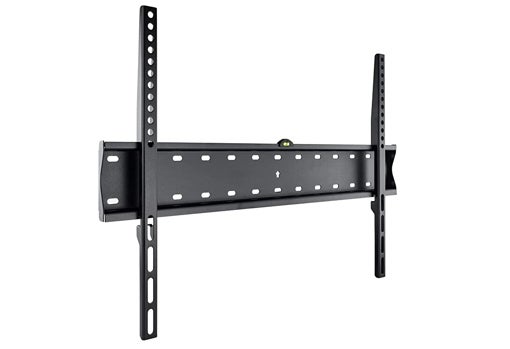
The mount allows your screen to be placed at a distance of just 20 mm from the wall, includes a bubble level, ultra-thin.
VESA format up to 600x400 , black color and a maximum load of 40kg.
It also supports curved screens.
With this wall-mount monitor mount, you can optimize your workspace by removing your monitor from its surface, freeing up valuable desk space.
BONTEC Monitor Wall Mount from 13 to 42 Inches
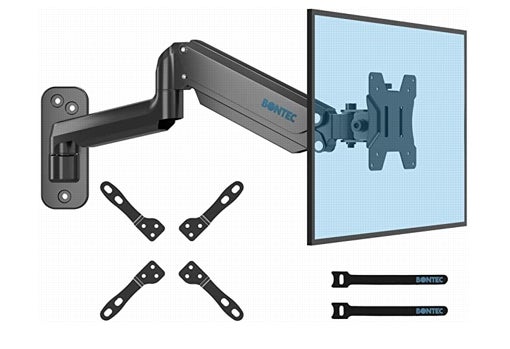
The Bontec monitor stand is designed with a sturdy, height-adjustable gas lift arm. It's strong, sturdy, and extremely versatile, maximizing both space and comfort.
This monitor stand is adjustable and compatible. It can hold 13-42 inch monitors up to 8kg. The VESA mount is 75x75 / 100x100 / 100x200 / 200x100 / 200x200 . The adjustable arm offers -35 °/+35° tilt, 180° swivel, 360° rotation, providing the best viewing angle with ergonomic comfort to reduce neck, shoulder or back pain.
You'll have a perfect viewing experience. This gas-spring wall mount is a multipurpose wall-mounting solution for PC monitors, ideal for optimizing your workspace or giving your gaming setup that extra edge.
It features high-quality materials. High-quality, polished aircraft-grade aluminum for long life and easy maintenance. Thanks to the low damping rate of 5%, the gas spring arm minimizes noise and unwanted movement.
This single-arm gas-spring mount is easy to install in just three simple steps. First, secure the mount to the wall; second, connect the monitor to the VESA plate; and third, adjust the tension according to the monitor's weight.
The hidden cable management system helps organize cables for a clean and tidy workspace. Two cable clips are also included.
Types of monitor wall mounts
There are different types of monitor wall mounts.
Fixed wall mounts. These are the simplest wall mounts. They simply fit onto the wall and the TV is screwed into place. Fixed means the TV cannot be moved in any direction.
Tilting wall mounts. These mounts allow the device to be adjusted. They are an evolution of the previous models, as they have a system for tilting vertically or horizontally.
Arm wall mounts. These are the most versatile wall mounts. Unlike the previous ones, between the bracket that attaches to the wall and the module for screwing the TV in, there is a movable arm that can move in almost any direction.
Advantages of monitor wall mounts
You'll optimize your space. Your workplace will be more spacious, clean, and organized, as you won't have cables everywhere.
The monitor wall mounts are easy to install and remove , and can also be readjusted if needed in the future.
With wall mounts, you don't need an additional table to place your monitors.
Disadvantages of monitor wall mounts
They are not very versatile.
If they are fixed, it will limit mobility.
If you need to move your TV, you'll need to be very careful not to break the wall or damage the cables.
VESA mounting system
The VESA mounting system is a standard of the international organization Video Electronics Standards Association (VESA), which promotes the standardization of various aspects in technologies from different manufacturers.
VESA is a standard measurement used for wall mounts and other mounting systems used by most brands.
The VESA mounting standard defines the distance in millimeters between the 4 holes on the back of the display (horizontal distance x vertical distance)
The most common VESA measurements are: 200x200 for TVs up to 32 inches, VESA 400x400 for TVs up to 60 inches, and VESA 600x400 for TVs with larger screens up to 84 inches.
It allows you to attach the monitor to a mount using holes located on the back. Therefore, when purchasing a VESA mount, make sure the holes correspond to your monitor's weight and size.
These days, almost all monitors can be fitted with this type of mount, or even have one included. The VESA mount can be mounted on a wall or on a surface.







