


Monitor arms are usually anchored to a table, or to the wall if they are fixed, and allow for easier and faster adjustment.
With them, you can hold your computer screens and maintain a comfortable viewing angle. You can adjust the height, tilt, and swivel it, which will be incredibly practical.

Monitor arms can improve concentration by reducing eye, neck, shoulder, and back strain, and allow you to customize your desk space to your specific needs. For example, if you have multiple monitors and want to reduce and customize your workspace, articulating arms are a highly recommended solution.
We present a selection of the best monitor arms that will be very practical if you want to have a clear desk and make the most of your space.
Duronic DM451X3 Monitor Mount for 15" to 27" Inches
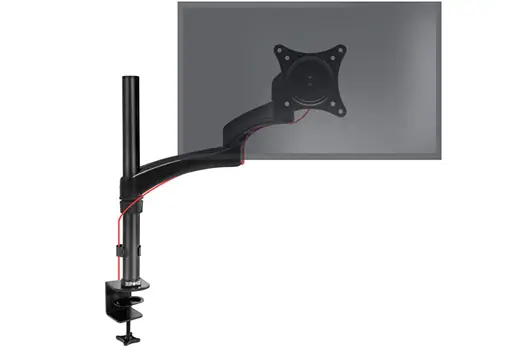
The DM451X3 monitor arm is a sturdy yet lightweight aluminum monitor stand that attaches to a clamp. It lets you adjust your monitors to your desired viewing angle. This is possible thanks to the flexible gas-spring arm and adjustable VESA heads, which reduce the space occupied by the monitor stands and keep your desk clear, optimizing your tabletop order.
It adapts to your needs. It has one extended arm with two joints. These joints allow you to easily maneuver the screens and also tilt them forward or backward. The VESA heads that hold the screens offer great adjustability: they can pivot left and right, tilt up or down, and rotate 360º, giving you the option of positioning the monitors vertically.
The DM451X3 is compatible with most VESA-compatible monitor brands (Samsung, LG, Dell). This mount holds displays ranging from 15 to 27 inches and a maximum weight of 8 kg. The VESA head will hold a monitor with VESA 100 or VESA 75 mounting holes (the vertical and horizontal distance between the screws on the back of the display must be 10 cm or 7.5 cm). The clamp has a maximum opening of 68 mm and offers excellent stability.
The DM4541X3 monitor stand is made of die-cast aluminum. The pole will sit firmly on your desk, holding your monitors precisely and easily. It can be attached to your right side using the included clamp or a grip can be installed, which you can purchase separately: DM-GR-01.
Most monitors aren't level, which can be a major problem for most people. They're often below their eye level, causing them to tilt their heads downward, causing pain in their neck, shoulders, and back, negatively impacting their posture, well-being, and productivity. This ergonomic stand restores balance by correcting posture.
StarTech.com Dual Monitor Stand with Swing Arms
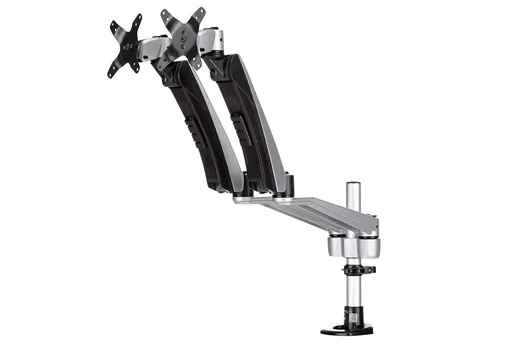
StarTech.com Dual Monitor Stand with Swing Arms - Stackable, features interchangeable arms with spring-loaded height adjustment for flexible setup.
It features full-motion articulating arms. The adjustable dual-monitor arm allows for a wide range of motion on multiple axes, including tilt, swivel, and rotation. It also allows for switching from horizontal to vertical position.
You can create a dual-monitor setup side-by-side (for monitors up to 30") or stacked (for monitors up to 24")
Horizontal configuration
Create a dual-monitor setup that suits your needs using the interchangeable arms with quick-connect mounting. Create a more comfortable and productive workspace by using two monitors, positioned side by side. In a horizontal configuration, the mount supports two monitors ranging in size from 12" to 30". Ideal for a variety of uses, including graphic design, photo editing, and more.
Vertical configuration
As a vertical monitor mount, this dual-monitor arm supports 12" to 24" monitors. The stacked configuration makes it easy to compare information between both displays without having to scroll through each screen.
The Startech ARMDUAL30 dual monitor arm allows for custom adjustments to your workspace with this premium quality desk mount dual monitor arm.
It supports two monitors that support a VESA mount (75x75, 100x100), either side by side or stacked. These full-motion, spring-loaded height-adjustable articulating arms allow for easy monitor repositioning.
Thanks to its steel and aluminum construction, the dual-monitor mount has a weight capacity of 9kg per arm.
The slide-and-click design allows for easy mounting of two monitors. Secure the monitor mount to the side of your desk or table (with the desk clamp) or to a grommet on your table/desk.
Duronic DM354 BK Quad Monitor Arm 13" to 27" - For 4 Screens
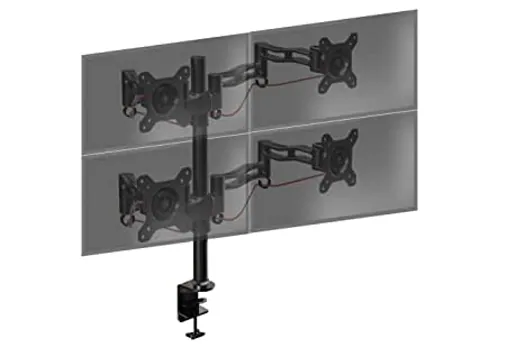
The Duronic DM354 is a four-monitor or TV stand made of die-cast aluminum that attaches to your desk using a clamp. With this stand, you can adjust your screens to your desired viewing angle . This is possible thanks to the adjustable arm and head, which also reduce the space occupied by the device bases and keep your desk clutter-free, optimizing the organization of your office or bedroom.
The DM354 mount allows you to adjust the tilt angle of your computer or TV monitor to improve your viewing angle. It features four extendable and rotating arms with adjustable heights of up to 60 cm.
This mount is suitable for displays weighing up to 8 kg and measuring between 13 and 27 inches (33–68 cm) . This mount offers a tilt angle of ±15°, 180° lateral movement, and up to 360° screen rotation.
This mount is suitable for displays and televisions compatible with VESA 100x100 and VESA 75x75 mounting standards (the vertical and horizontal distance between the screws on the back of the display must be 10 cm or 7.5 cm). The clamp has a maximum opening of 68 mm and offers excellent stability. Depending on the model, the monitor extension varies slightly to adapt to the total weight of the installation.
This range is made of aluminum and features a cable management system. The DM354 model features four articulating arms and heads. No tools are required to reposition the screen.
There is a wide range of monitor mounts on the market, as well as a wide variety of accessories that allow you to adapt the different models to the desired type and installation method, such as arms to increase compatibility with larger screens, multiple mounts, additional heads, computer mounts, etc.
Invision Dual Monitor Mount PC Arm - Gas Assisted - MX300
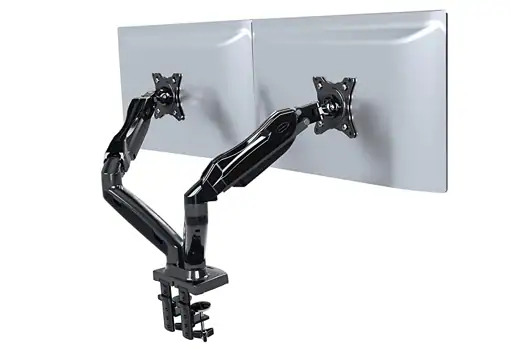
Invision Dual Monitor PC Stand Arm - Gas Assist , is an adjustable and ergonomic desk mount with clamp
Unlike mechanical monitor mounts, which require unscrewing to adjust their position, the MX300 dual-screen monitor arm uses ElevationAssist technology, a gas strut that counteracts the weight of the display, allowing for easy fingertip adjustment. This allows you to maintain a secure and comfortable working position with much greater flexibility.
This dual-arm is sturdy and durable. It's designed for strength and stability with a reinforced aerodynamic die-cast alloy frame and steel ring compression swivel fittings that ensure reliability and zero sag.
It has a 360° full-screen rotation capability for both horizontal and vertical viewing. Its ergonomic comfort reduces the health risks of sitting at your desk for long periods of time. You can adjust the height and enjoy a wide range of viewing angles.
Upper horizontal arm rotation: 360º. Base horizontal arm rotation: 220º. Front plate rotation: 360º. Vertical tilt angle: +35º/-50º
The MX300 is very versatile and easy to install. It offers two mounting methods that securely attach the mount to your desk. You can also combine two mounts to configure a dual display. The MX300 is suitable for 17-27" displays.
Things to consider when purchasing a monitor arm
It's important to keep in mind a number of factors before choosing a monitor arm model.
Screen or monitor size
Many of the best-selling monitors on the market are very large, so it can be difficult to find suitable monitor arms. If it's too large, the arm may bump into the monitor and you may need to reposition it from horizontal to vertical.
If you have multiple monitors on a single arm, you'll want to consider whether the arm can keep the monitors at the same height and at an optimal distance that's comfortable for you when you're seated.
It is therefore very important that the monitor arm you choose adapts to your specific needs.
Load capacity
Check the load capacity of the arm you choose. If the monitor is too large, it will be too heavy, and the arm may not be able to maintain a firm position and may be difficult to tilt or rotate.
Number of screens
The current trend is to have multiple monitors in the same workspace. Having dual or triple displays is often required by the job, and other times it simply helps increase productivity and efficiency.
Whether you choose a single monitor arm or a multi-monitor mount depends on the number of monitors you will be using.
Space
It's important to consider the space behind your desk . The arm can often hit the wall if space is limited. It's recommended that they include an integrated rotation stop, which offers selectable movement from 180° to 360°. This prevents the arm from hitting the back walls.
You also have to consider the space you have on your desk, because often the arms are too long and get too close to your eyes. There are models on the market that have solved this problem by reducing the length of the arms. This makes the monitor's position optimal and also frees up space on your desk.
Table thickness
If you're looking for a dual-monitor mount—an extended monitor arm with one or two monitors on either end—you'll need a sturdy table to support the weight.
If you have a thin table, you can reduce the weight of the ends, and therefore reduce tension, by placing a piece of wood underneath the base to spread the pressure force and achieve greater stabilization.
Installation types
Many monitor arms include either a clamp or grommet mount, and some arm models include both mounting options. Freestanding mounts (with a built-in base) are the easiest way to add a monitor arm to any desk.
Wall-mounted monitor arms are also available , which is recommended if monitors require visibility in areas such as hospitality or retail.
Design
Many monitor arms allow you to tuck away cables, providing a much better cable management system than a monitor stand. However, to achieve a perfect fit, you'll need to use additional cable ties.
There are many models of monitor arms for both vertical and horizontal positioning. There are also mounts for two or even three aligned screens.
To maximize vertical space, opt for a modular design, so you can place keyboards, a microphone or webcam arm on top, a light for recording videos, etc.
VESA Compatibility & VESA Plate
It's important to check if your monitor has a standard VESA pattern , or if you need a non-VESA mount to fit your monitor to a standard-sized VESA plate.
The 75x75mm or 100x100mm VESA mounting hole pattern is located on the back of each computer monitor.
Don't hesitate to find the monitor arm that best suits your needs. You can position your monitor at your ideal height, move it closer or further away, rotate it, or tilt it. It's the most versatile option for customizing your desk.







